
Browser autofill is one of those features people notice only when it fails. It is excellent for simple identity fields: name, email, phone, address, payment card, and sometimes login credentials. For many checkout pages and account forms, that is enough.
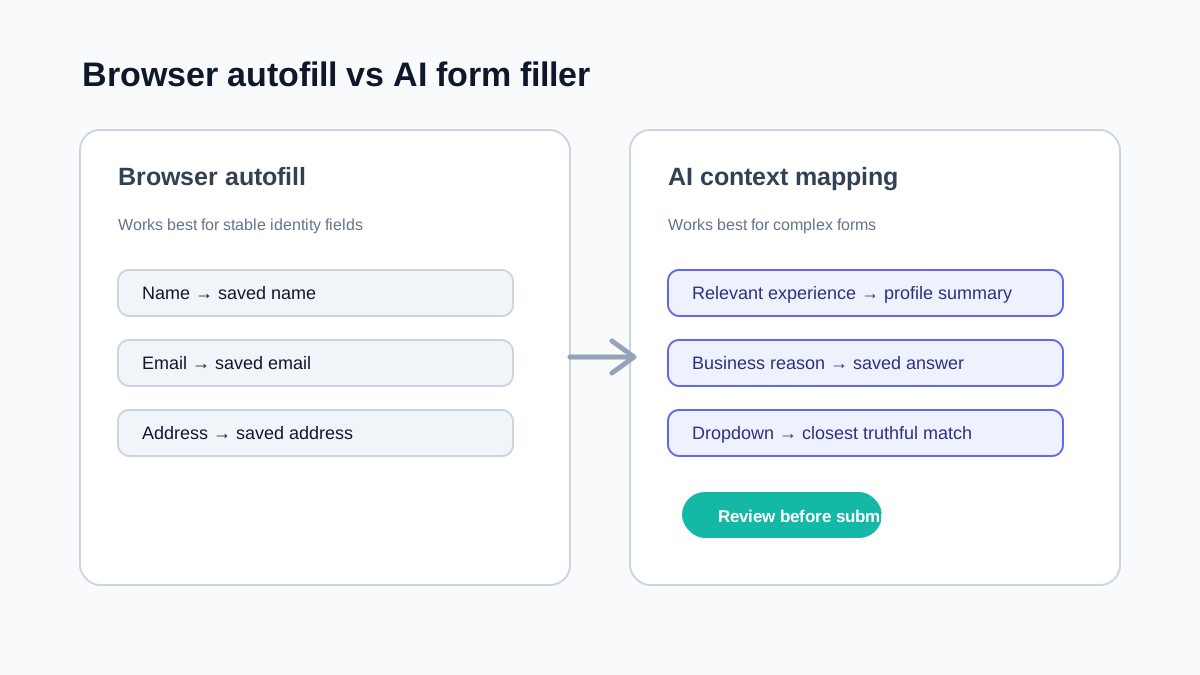
An AI form filler solves a different problem. It is meant for complex forms where the field is not merely asking "What is your email?" but "Which saved answer, document detail, or short explanation belongs here?"
The difference matters. If you expect browser autofill to understand a long operational form, it will feel weak. If you expect an AI form filler to act like a password manager or payment vault, you are using the wrong tool.
Browser autofill is pattern matching
Most browser autofill behavior depends on recognizable field names, labels, autocomplete attributes, and previous saved values. That works well when developers use standard HTML conventions. MDN documents how the HTML autocomplete attribute identifies common field purposes, while Chrome's autofill research explains why real-world implementations still vary.
Browser autofill is usually good at:
- Names.
- Email addresses.
- Phone numbers.
- Billing and shipping addresses.
- Payment details when saved in the browser.
- Password and passkey flows.
It can be fast, private, and familiar. It also has clear limits.
Browser autofill often struggles with:
- Custom dropdown components.
- Forms with nonstandard labels.
- Multi-step intake flows.
- Long text answers.
- Internal tools that reuse generic field names.
- Forms that ask for the same concept using different wording.
- Fields that require context from a resume, customer record, or saved notes.
That is why people search for terms like AI form filler, auto form filler, and form filler extension. The need appears when "saved address" is no longer the hard part.
AI form filler is context mapping
An AI form filler looks at compatible visible fields, labels, surrounding text, and your saved profile or instructions. It then tries to map the right information to the right place.
It is better suited to complex forms such as:
- Compatible native fields on job application and ATS pages.
- Customer onboarding forms.
- CRM updates.
- Vendor intake forms.
- Research and survey forms.
- Internal admin tools.
- QA and staging workflows.
For example, a browser may not know what to do with a textarea labeled "Relevant experience." An AI form filler can use your profile and infer that this field needs a short work summary. A browser may not know whether "Website" should be your company site, personal portfolio, or LinkedIn URL. An AI form filler can make a better draft if your saved profile contains all three and the page gives enough context.
The real choice is not one or the other
For daily work, the best setup is often both:
- Use browser autofill for identity, address, payment, and credential fields.
- Use an AI form filler for contextual fields, repeated business answers, and nonstandard form layouts.
That keeps the fast path fast. It also keeps sensitive browser-managed data, such as payment details, inside the system designed for it.
SmartAutoFill is designed for the second category. The AI form filler product overview explains that workflow. It is not trying to replace every browser feature or claim support for every custom widget; it is meant to fill the gap between simple saved values and compatible fields on messy real-world forms.
A good AI form filler should not auto-submit
The most important design choice is not whether the tool can fill fast. It is whether the user stays in control.
Complex forms can contain fields that are costly to get wrong:
- Legal or compliance attestations.
- Work authorization.
- Medical or insurance details.
- Salary expectations.
- Financial information.
- Customer commitments.
- Security or access requests.
For these, "one-click submit" is not a feature. It is a risk.
A safer workflow is:
- Let the tool draft field values.
- Review the filled page.
- Edit anything that needs judgment.
- Submit manually.
This is the model SmartAutoFill follows. The goal is fewer repeated keystrokes, not removing accountability.
How to decide which tool to use
Use browser autofill when:
- The form is a common checkout, signup, or address form.
- The site uses standard labels.
- The answers are stable and literal.
- The information is already saved in Chrome.
Use an AI form filler when:
- The form asks for longer text.
- Fields are labeled in unusual ways.
- You need to reuse saved answers across different sites.
- The same data appears in different formats.
- You want a draft that considers page context.
Use neither, or use manual entry, when:
- You do not understand what the field is asking.
- The answer is legally sensitive.
- The information is not saved or verified.
- The page is asking for consent, certification, or a signature.
What "complex forms" really means
Complex forms are not always visually complex. Some look plain. The complexity comes from meaning.
A form is complex when:
- The field label is ambiguous.
- The answer depends on the surrounding page.
- Multiple saved answers could fit.
- A dropdown option must be chosen from imperfect matches.
- The form combines structured fields and free text.
- The cost of a wrong answer is higher than a typo.
That is why AI form filling should be built around interpretation and review, not raw speed alone.
Bottom line
Browser autofill is excellent for known personal data. AI form filler tools are useful when forms ask for context, long answers, or repeated business information that changes shape from site to site.
The healthiest workflow is not to automate everything. It is to automate the boring draft, keep the human review, and submit only after the page says what you mean.
To compare the behavior yourself, try both approaches on the AI form filler test page. Check the supported fields and data-handling details before relying on a custom control or file input, and use the public-feature extension comparison when you are choosing between products rather than between autofill categories.