
Job Application Autofill without losing review control
SmartAutoFill helps job seekers fill compatible native ATS and career-site fields from standard saved facts, pasted context, or paid AI Materials Pro, while keeping review and submission manual.
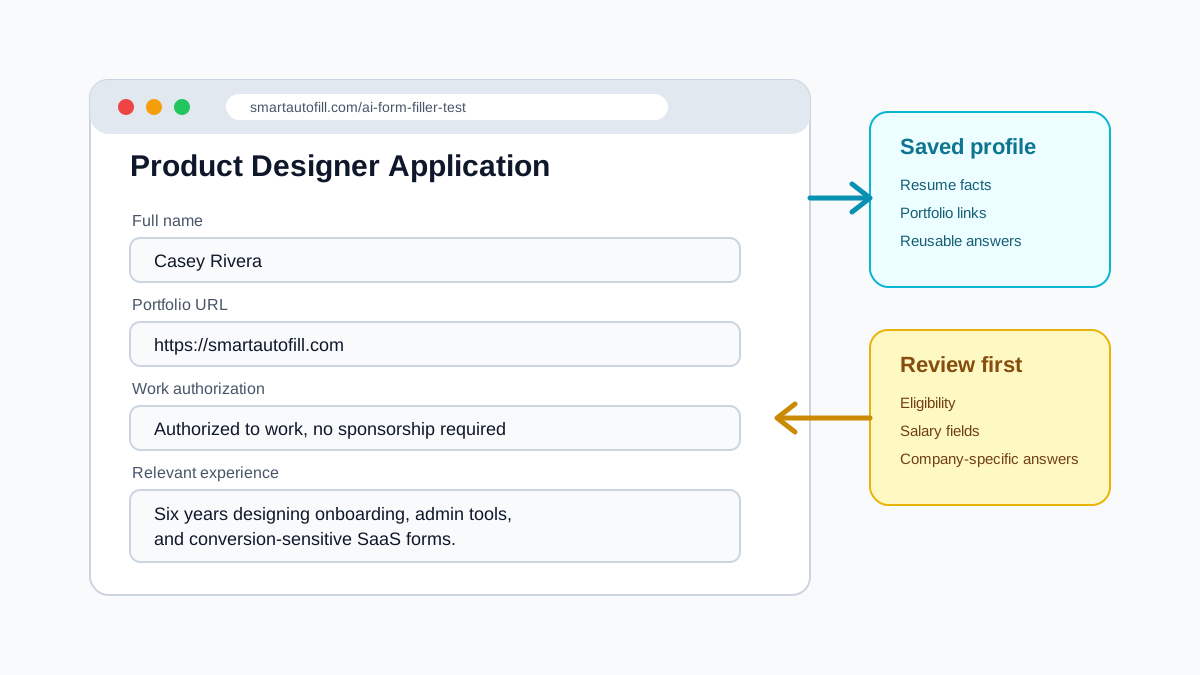
Built for the parts of job applications people repeat
Job application autofill is useful when every form asks for the same facts in slightly different ways.
Standard saved profile facts
Reuse name, email, phone, location, portfolio, LinkedIn, GitHub, website, and other standard profile fields.
Work history and education context
Draft role, project, work history, or education answers from pasted context or paid AI Materials Pro, not from the standard saved profile alone.
Screening questions
Use saved answers for repeated questions while leaving legal, eligibility, and salary fields for careful review.
No auto-submit
SmartAutoFill fills draft values only. You review every application before submitting.
Use it on repeated ATS and career-site workflows
Workday, Greenhouse, Lever, Ashby, iCIMS, LinkedIn, Indeed, and company career pages often ask for similar information with different labels. SmartAutoFill can work with compatible native fields, but makes no site-specific guarantee.
Richer application facts
Use pasted context or paid AI Materials Pro for education, work history, project details, and tailored summaries.
Custom questions
Draft answers for repeated free-text prompts from your own saved context.
Sensitive fields
Review work authorization, salary, voluntary disclosure, and signature fields yourself.
Manual submission
The extension does not submit applications for you.
A safer job application autofill flow
Use AI for the repetitive draft, then review the application yourself.
- 1
Save your application profile
Add contact details, links, role summaries, and reusable answers.
- 2
Open an application form
Use SmartAutoFill on the career site or ATS page you are filling.
- 3
Generate draft values
AI maps available facts to compatible visible fields and skips sensitive areas by default.
- 4
Review and submit manually
Check legal, salary, eligibility, and custom answers before submitting.
Job application autofill FAQ
Compatibility, resume context, file input, and submission boundaries for AI-assisted applications.
Fill the repeated parts of job applications faster
Start with the AI form filler test page, then use SmartAutoFill on your own reviewed application workflow.