
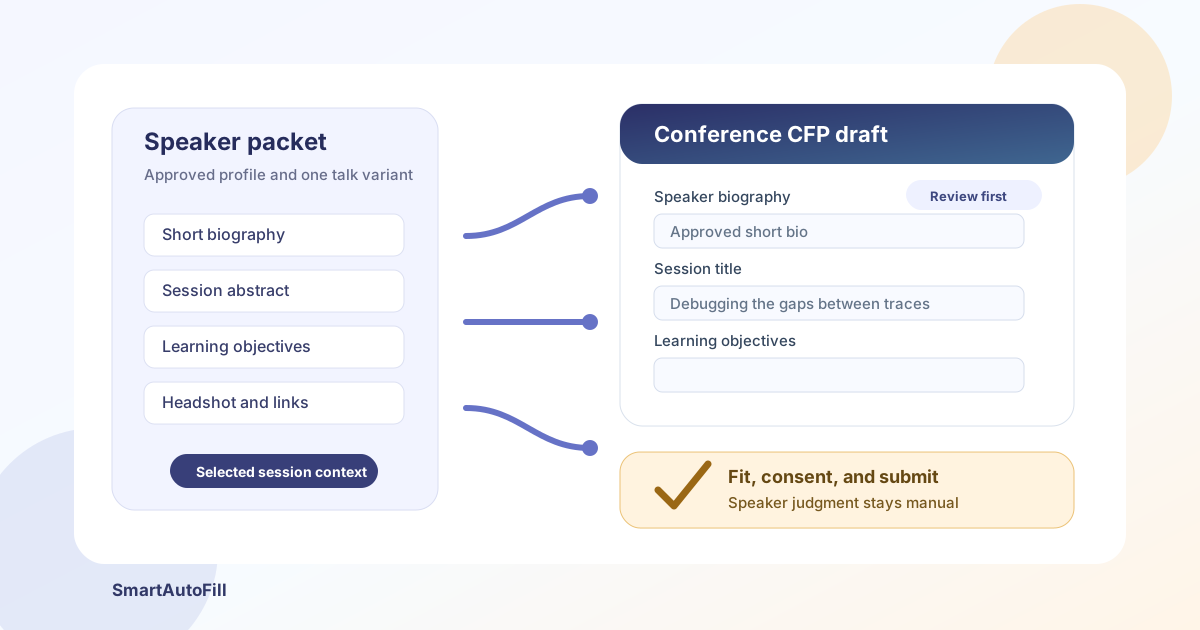
Conference speaker applications are full of repetition. The same name, title, biography, headshot, social links, session title, abstract, and past-speaking references appear in one call for proposals after another. Yet the part that determines whether a proposal belongs at an event is not repetitive at all.
That split is where an AI form filler for conference speaker proposals can help. SmartAutoFill can move approved speaker and session context into compatible browser fields for review. It should not decide whether a talk fits the audience, rewrite evidence into invented expertise, accept organizer terms on your behalf, add a co-speaker without permission, or submit the proposal.
The useful outcome is modest: a review-first workflow with less browser data entry and more attention left for the proposal itself.
Why CFP forms are a distinct workflow
A call for proposals, call for papers, or call for speakers usually combines three kinds of information:
- Stable speaker facts — name, role, company, location, biography, headshot, website, and profile links.
- Reusable session material — a working title, abstract, outline, learning objectives, format, level, and previous delivery links.
- Event-specific judgment — audience fit, track selection, code of conduct, availability, travel terms, originality, commercial-interest disclosures, and consent.
The first category is a strong fit for saved context. The second can be reused as a starting point, but rarely without editing. The third belongs to the speaker or an authorized representative.
Sessionize's speaker guide reflects this mixture: a submission includes session information plus speaker details, and an existing session or speaker profile can be reused and then customized for another event. The Grace Hopper Celebration proposal checklist asks applicants to prepare a title, description, outline, learning objectives, biographies, headshots, and profile information. Those are repeatable assets, but the limits and expectations are specific to the event.
This is not ordinary contact autofill. A browser password manager may know your name and email, while a text expander may paste a saved biography. A review-first AI form filler can use field labels and selected context to draft a broader set of compatible fields without treating the whole CFP as a fixed template.
Start with a speaker packet, not a generic profile
The target ICP is an active speaker, developer advocate, consultant, researcher, founder, or community lead who submits a small number of serious proposals across different portals. The buying intent is practical: reuse approved material without flattening every application into the same pitch.
Create a focused speaker packet before opening the form:
Speaker profile
Name: Amina Reed
Role: Staff Developer Advocate
Organization: Northstar Systems
Short bio: Amina helps platform teams explain and operate distributed systems.
Long bio: Amina Reed is a Staff Developer Advocate at Northstar Systems...
Website: https://example.com
LinkedIn: https://www.linkedin.com/in/example
GitHub: https://github.com/example

Session profile
Title: Debugging the Gaps Between Traces and Reality
Format: 40-minute technical talk
Audience: Intermediate platform and reliability engineers
Abstract: A field guide to finding observability gaps in distributed systems...
Learning objectives:
- Identify where trace context is commonly lost.
- Compare service evidence before changing instrumentation.
- Build a review checklist for incomplete telemetry.
Prior delivery: https://example.com/talk-video
Keep factual profile data separate from event-specific answers. If an organizer asks, "Why is this topic relevant to our audience?" the correct response should reflect that event's tracks, attendees, and selection criteria. It should not be pulled blindly from a generic session summary.
For several talk variants, use separate context profiles. One profile might contain the 20-minute version, another the workshop version, and another a non-technical leadership session. This reduces the chance of mixing a duration, level, or promise from the wrong proposal.
What SmartAutoFill can reasonably draft
SmartAutoFill is a review-first AI form filler Chrome extension. It scans visible compatible fields on the current page, considers the selected saved profile or context, generates a fill plan, and places supported values into the page. You inspect and correct the result before submitting manually.
On a CFP portal, good candidates include:
- Speaker name, professional title, organization, location, and contact details.
- Short and long biography fields when the portal labels them clearly.
- Website, LinkedIn, GitHub, portfolio, or prior-speaking links.
- Session title, abstract, outline, audience level, and learning objectives from the selected session profile.
- Plain native select controls for a format or experience level, when the available option clearly matches the source context.
- A native headshot or supporting-material upload when paid hosted AI Materials has one eligible, intentionally selected file that matches the input.
These are drafts, not verified submissions. Character limits can truncate a biography. A select option called "Advanced" may describe attendee knowledge rather than speaker experience. A field called "Description" may be public marketing copy rather than the reviewer-facing abstract. Read the helper text and inspect every result.
You can test SmartAutoFill on a public sample form before using it on a real CFP. The supported fields and data-handling reference explains the current browser-control, storage, and sensitive-field boundaries.
What should stay manual
Keep consequential or ambiguous decisions outside casual autofill:
- Track, theme, and audience-fit choices that require reading the current event brief.
- Originality, prior-publication, exclusivity, or commercial-interest disclosures.
- Code-of-conduct acceptance, recording permission, image-release terms, privacy consent, and speaker agreements.
- Travel, visa, reimbursement, honorarium, accessibility, and scheduling commitments.
- Co-speaker names, biographies, contact details, and consent unless each person has authorized the submission.
- Demographic, diversity, accessibility, or accommodation questions that the speaker should answer personally.
- Password, MFA, CAPTCHA, identity, payment, tax, bank, or government-identifier fields.
- The final submit action.
This caution matters because CFP portals do not share one universal lifecycle. pretalx documents that organizers can control whether a submitted proposal remains editable. A correction that is easy in one portal may require an organizer in another. Review before submission is cheaper than trying to recover afterward.
SmartAutoFill does not navigate the portal, create accounts, manage deadlines, invite co-speakers, or submit forms. Custom widgets and embedded frames may also remain manual. That boundary is useful: the extension assists with the page in front of you without pretending to run the whole speaker program.
Safe Mode, More Mode, and CFP risk
Start with Safe Mode when the page contains unfamiliar questions or mixed personal and session information. It favors fields with clearer labels and stronger context matches.
More Mode can consider additional ambiguous candidates during planning, but it does not remove the product's sensitive-field and unfillable-control guards. More is not permission to fill consent, identity, password, payment, or CAPTCHA fields. It also does not resolve an ambiguous organizer question.
Use More only after reading the entire form and selecting a context profile built for that event and session. If a proposal has both a public abstract and private reviewer notes, confirm that each draft landed in the correct field.
A review-first CFP workflow
1. Read the event before opening the extension
Check the audience, tracks, formats, deadlines, evaluation criteria, speaker terms, and prohibited content. Some events prohibit sales pitches; others require original material or a specific experience level. The portal labels alone may not contain those rules.
2. Choose one session variant
Select the exact talk, workshop, or panel profile you intend to propose. Confirm its duration, audience, title, abstract, and learning objectives before filling anything.
3. Fill only the compatible page
Run SmartAutoFill on the visible form. Do not assume hidden steps, custom widgets, or later pages were handled. Hosted filling uses account credits; current packs and AI Materials limits are listed on SmartAutoFill pricing.
4. Review field by field
Compare the page with the event brief and your source packet. Pay special attention to character limits, public-versus-private descriptions, co-speaker details, links, dates, time zones, track choices, and any file input.
5. Rewrite the event-specific answers
Adapt the abstract, takeaways, and audience statement to the event. Reuse facts and approved core material, not a generic claim that the same proposal is perfect everywhere.
6. Handle consent and submission yourself
Read each agreement. Confirm permissions with co-speakers. Save a copy of the final answers if appropriate, then submit manually and retain the organizer's confirmation.
Where AI Materials Pro fits
AI Materials Pro can provide richer source context from an approved talk brief, speaker sheet, or proposal document. That can help when a portal asks for a condensed abstract, learning objectives, or a short biography and the basic profile is not enough.
It can also match one eligible stored file to a compatible native file input in paid hosted mode. For CFP work, that might be a headshot or a supporting document. It does not guarantee support for custom upload widgets, multi-file controls, cropping tools, file-size rules, or organizer-specific naming requirements. Inspect the selected file and the portal's upload state.
Use the smallest relevant source set. A speaker proposal rarely needs access to unrelated contracts, customer data, internal roadmaps, or confidential research. Custom-provider mode does not support AI Materials or file filling.
Negative ICP: who should not use this
The negative ICP is just as important as the target customer. SmartAutoFill is not for people who want to:
- Mass-submit generic or low-effort proposals to every open CFP.
- Invent credentials, past talks, customer results, research findings, or affiliations.
- Ignore event themes, audience needs, originality rules, or anti-promotion policies.
- Add co-speakers or share their personal data without permission.
- Accept legal, recording, privacy, or code-of-conduct terms without reading them.
- Bypass accounts, CAPTCHA, MFA, deadlines, rate limits, or organizer controls.
- Automate final submission with no field-by-field review.
Those users need a different process, not a faster form filler. A conference proposal is a promise to an audience and an organizer. Repetitive typing can be assisted; authorship and responsibility cannot be delegated.
A practical buying checklist
Before choosing a CFP form-filling tool, ask:
- Can it use separate speaker and session profiles instead of one giant personal profile?
- Does it draft into the page for review, or does it submit automatically?
- Can you see and correct every filled value before the portal receives the proposal?
- Does it clearly exclude passwords, payment details, identity checks, CAPTCHA, and other sensitive controls?
- Can it handle ordinary text fields and native selects without claiming universal portal support?
- Are file-upload limits explained clearly?
- Can you test it safely before spending credits on a real application?
For a broader tool comparison, see AI form filler vs browser autofill and text expander vs AI form filler.
Bottom line
An AI form filler for conference speaker proposals is useful when it carries approved speaker facts and a selected session draft into compatible CFP fields. It is the wrong tool for deciding audience fit, inventing authority, accepting terms, or spraying generic proposals across events.
SmartAutoFill fits the middle of the workflow: after you have prepared a credible speaker packet and before you complete the human review and manual submission. If that is the part slowing you down, start with the AI form filler overview, try the public test form, and keep the final proposal under your control.