
An auto survey extension can be useful when you keep answering the same kinds of survey questions across research panels, customer intake forms, school feedback, training forms, or internal questionnaires. The problem is not that every survey should be automated. The problem is that many surveys ask for the same stable facts before they reach the questions that actually need thought.
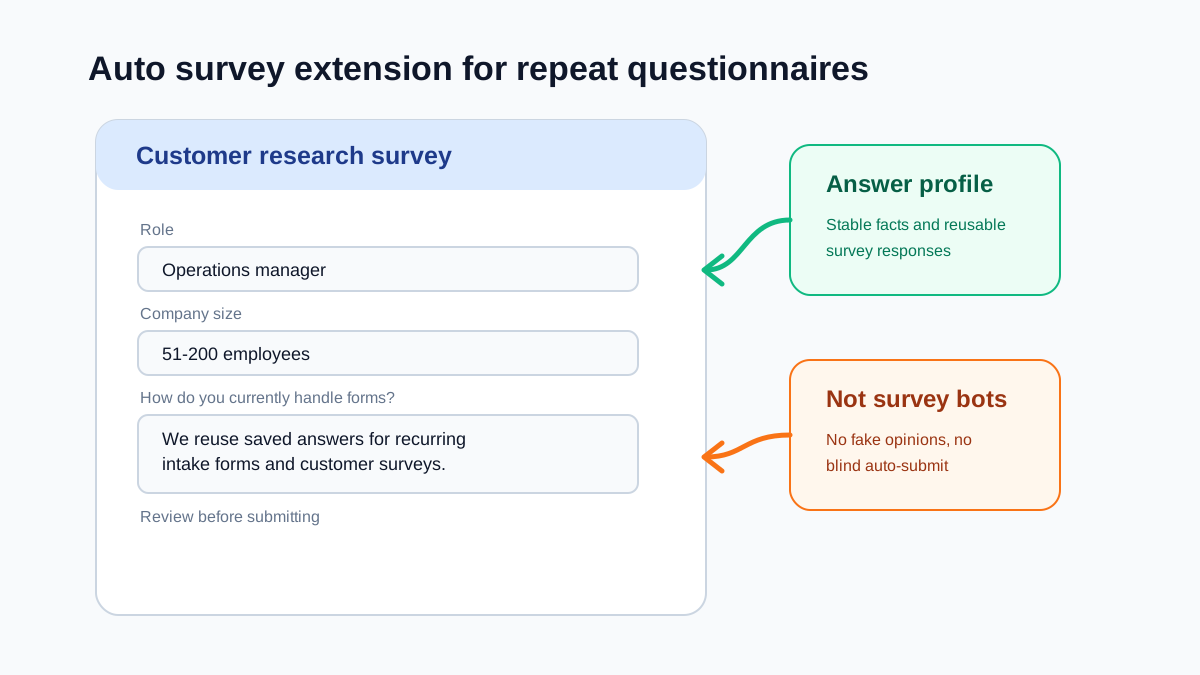
There is an important line here. A healthy survey autofill workflow reuses truthful profile information and repeat answers you already reviewed. It does not invent opinions, rush through consent, or blindly submit forms. If the goal is to fake responses at scale, that is not form productivity. That is bad data.
SmartAutoFill is better suited to the legitimate version of this workflow: fill compatible repetitive fields on the page, let the user review the result there, and keep submission manual. The Google Forms autofill workflow describes the product boundary for this use case.
What people usually mean by auto survey extension
The phrase auto survey extension can mean several different things. Some users want a tool that completes surveys automatically. That is risky, often against platform rules, and usually produces low-quality answers. Other users simply want to stop typing the same demographic, work profile, or background information into every survey.
The second use case is the one worth solving.
Common repeated survey fields include:
- Name or nickname.
- Email address.
- Role or job title.
- Company size.
- Industry.
- Country or region.
- Age range or demographic category, when the user chooses to store it.
- Product usage profile.
- Business context.
- Reusable explanations for how a team works.
Those fields are repetitive, but they still need to be accurate. Saving them once and reusing them carefully can make survey participation less tedious without corrupting the response.
Where survey autofill helps
Survey autofill is useful in forms that mix stable profile fields with short-answer questions.
Examples include:
- Customer research surveys.
- Beta testing questionnaires.
- Product feedback forms.
- Course and workshop evaluations.
- Internal team pulse surveys.
- Vendor qualification forms.
- User interview screeners.
- Community application forms.
In these forms, you may repeatedly answer "What is your role?", "How large is your team?", "Which tools do you use?", or "What workflow are you trying to improve?" Those answers often come from the same saved profile.
The hard part is knowing when a question is still asking for a fresh opinion. A good auto survey extension should make that boundary visible.
What should never be blindly filled
Some survey questions are not profile data. They are the point of the survey.
Be careful with:
- Satisfaction ratings.
- Ranking questions.
- Open-ended feedback.
- Consent checkboxes.
- Eligibility confirmations.
- Screening questions for paid studies.
- Questions about whether you used a product or attended an event.
- Any field that asks for a current opinion or recent experience.
These should be reviewed every time. If an answer no longer reflects your situation, using an old saved answer is worse than leaving the form manual.
Choice controls also need a clear technical boundary: the current extension can detect radio buttons and checkboxes but does not select their state, and custom dropdown widgets are not reliably fillable. The supported fields and choice-control limits are the source of truth.
Build a survey answer profile
A useful survey profile should be short and specific.
Start with stable facts:
- Your role.
- Team size.
- Industry.
- Region.
- Work context.
- Common tools.
- Short description of your workflow.
Then add reusable explanations that are still truthful across many surveys. For example:
"I manage operations workflows for a small SaaS team and often handle customer intake, support forms, and internal process documentation."
That kind of answer can help with repeated survey forms because it describes a stable context. It should not replace a question that asks what you thought about a specific webinar, product release, or support interaction.
A safe workflow for repeat questionnaires
Use this process:
- Save stable profile details only.
- Run autofill after the full survey page loads.
- Review each filled value before moving to the next page.
- Manually answer rating, ranking, and opinion questions.
- Check consent and eligibility fields yourself.
- Submit manually.
The manual submit step matters. It turns the extension into a drafting tool rather than a survey bot.
How SmartAutoFill fits this use case
SmartAutoFill can read compatible visible fields, match them to your saved profile, and apply draft answers without asking hosted-mode users to configure an AI API key. That makes it useful for repeated surveys where text labels change but the underlying profile facts stay the same.
The intended workflow is controlled and reviewable. SmartAutoFill helps you fill recurring fields; it does not need to be a blind survey auto completer.
Bottom line
An auto survey extension is valuable when it saves time on repeated factual fields. It becomes harmful when it pretends to have opinions for you.
Use autofill for stable profile answers. Keep judgment-heavy questions manual. Review the page before submitting. That is the version of survey automation that helps users without damaging the survey itself.
You can try a repeat-questionnaire scenario on the test form before using a real survey. For a closely related workflow, read the Google Forms saved-answer guide.