
Job application autofill sounds simple until you spend a week applying across Workday, Greenhouse, Lever, Ashby, company career pages, and one-off agency forms. Your name, email, address, work authorization, LinkedIn URL, portfolio, education, employment history, and voluntary disclosures are the same every time. The labels, field order, dropdowns, and required formatting are not.
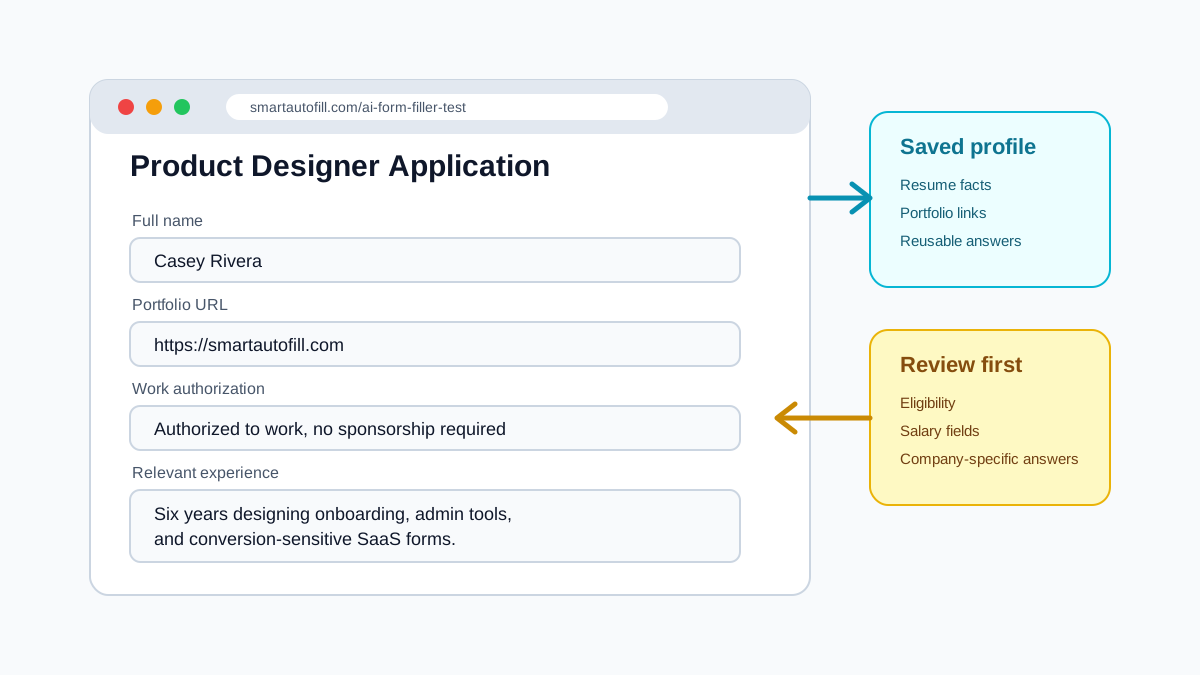
That mismatch is why job application autofill is a different problem from saving your address in a browser. A browser can remember stable identity fields. It usually cannot decide whether "Current company" should be copied from your resume, whether "Are you legally authorized to work?" maps to a saved answer, or whether a textarea is asking for a concise cover letter, a salary explanation, or a diversity statement.
AI helps when the form is not just asking for data, but asking for context. The job application autofill product guide documents the current workflow without claiming guaranteed support for a specific ATS.
Where the time actually goes
Most applicants do not lose time on the first two fields. They lose time on the middle of the application, where the same facts are requested in slightly different ways.
Common repeat sections include:
- Personal identity: name, email, phone, location, preferred name, pronouns.
- Online presence: LinkedIn, GitHub, portfolio, personal site, writing samples.
- Work eligibility: work authorization, visa sponsorship, relocation, remote preference.
- Experience summaries: current role, years of experience, notice period, target salary.
- Education: school, degree, graduation year, field of study.
- Work history: company names, titles, dates, descriptions, technologies, achievements.
- Screening answers: "Why are you interested?", "Tell us about a relevant project", "What makes you a fit?"
Traditional autofill works best for the first group. AI-assisted autofill is useful for the last three, especially when the form labels are not exact matches.
Build a profile before you apply
The strongest workflow is to prepare reusable sources before opening the first ATS. The standard saved profile is best for identity, contact details, and links. Work history and education should come from pasted context or paid AI Materials Pro rather than being attributed to the standard profile.
Include:
- A short professional summary, under 80 words.
- A longer role-specific summary, 150 to 250 words.
- Canonical links: LinkedIn, portfolio, GitHub, writing, case studies.
- Work authorization answers written exactly as you want them submitted.
- Education entries in pasted context or a supported AI Material, in a consistent format.
- Work history in pasted context or a supported AI Material, with dates, title, company, location, and two or three outcome-based bullets.
- A few reusable answers for common open questions.
For example, do not store only "I am a frontend engineer." Store something closer to: "Frontend engineer with six years of experience building React and TypeScript products for B2B teams, with a focus on onboarding flows, admin tooling, design systems, and conversion-sensitive forms." That sentence gives an AI form filler more context when it sees a question such as "Summarize your relevant experience."
What AI should fill, and what it should leave alone
The safest job application autofill flow is not "click once and submit everything." It is "fill the repetitive draft, then review before you submit."
Good candidates for autofill:
- Contact information.
- Links and profile URLs.
- Resume-derived work history supplied through pasted context or paid AI Materials Pro.
- Education details supplied through pasted context or paid AI Materials Pro.
- Text fields whose truthful answer is available in the selected context.
- First drafts for open-ended questions.
Fields that deserve manual review:
- Salary expectations.
- Visa sponsorship wording.
- Voluntary self-identification.
- Questions about criminal history, compliance, security clearance, or government work.
- Long-form answers that mention the specific company.
- Any question where the answer could affect legal or employment eligibility.
SmartAutoFill is intentionally built around review before you submit. The extension can prepare the form, but the final submission should remain yours. That matters because job applications are not just forms; they are records.
Use AI for mapping, not exaggeration
There is a bad way to use AI in job applications: asking it to invent accomplishments, overfit your profile to the job description, or produce a polished answer that does not sound like you. That may increase short-term submission speed, but it creates a downstream problem when recruiters ask about details you cannot defend.
Use AI to map truthful information into awkward forms:
- "This field asks for current employer; use my current company from the profile."
- "This textarea asks for relevant experience; adapt my existing project summary to this role."
- "This dropdown asks for years of experience; choose the closest truthful range."
- "This field asks for portfolio; use the product design case study link, not my personal homepage."
That distinction is important. Good job application autofill reduces repeated typing. It should not replace judgment.
A practical application workflow
Here is a workflow that works well when applying to multiple roles in a focused batch.
- Create one saved profile for your default application facts.
- Create a short note for the role type you are targeting, such as "frontend platform roles" or "customer success operations roles."
- Open the job application. In paid hosted mode, a matching AI Material can be placed into one compatible native file input; custom-provider mode does not support AI Materials or file filling.
- Run autofill only after the form has fully loaded.
- Scan required fields first: anything red, empty, or oddly selected.
- Review native selects, and handle radio buttons and checkboxes manually because the extension does not fill their state.
- Read every generated long answer out loud once. If it sounds generic, rewrite it.
- Confirm attachments, links, and contact details.
- Submit manually.
This keeps the time savings while avoiding the most common failure: an extension filling something plausible but not quite right.
How SmartAutoFill fits this scenario
SmartAutoFill is useful when you want a general AI form filler rather than a job-board-only tool. A job search often moves across ATS pages, portfolio forms, recruiter intake forms, referral pages, and sometimes Google Forms. Hosted mode can use the visible field labels, page context, standard profile facts, pasted context, and eligible AI Materials to draft values. It does not guarantee compatibility with every ATS or custom widget.
The point is not to apply to every job on the internet. The point is to make each serious application less repetitive, so you can spend your effort on role selection, tailoring, and follow-up.
Checklist before submitting
Before you submit any autofilled application, check:
- Is the company name correct in every long answer?
- Did the form choose the right work authorization option?
- Are salary and location preferences intentional?
- Are all dates formatted correctly?
- Are optional demographic answers filled only if you meant to save them?
- Did the AI leave any placeholder-like phrasing?
- Are attachments and portfolio links correct?
If the answer is yes, job application autofill has done its job: it removed repeated keystrokes while leaving the final judgment with you.
Before submitting a live application, use the public test form to try representative application fields. The field support reference explains compatibility limits, while the job-focused comparison helps you evaluate resume and ATS tools separately from the general extension category.