
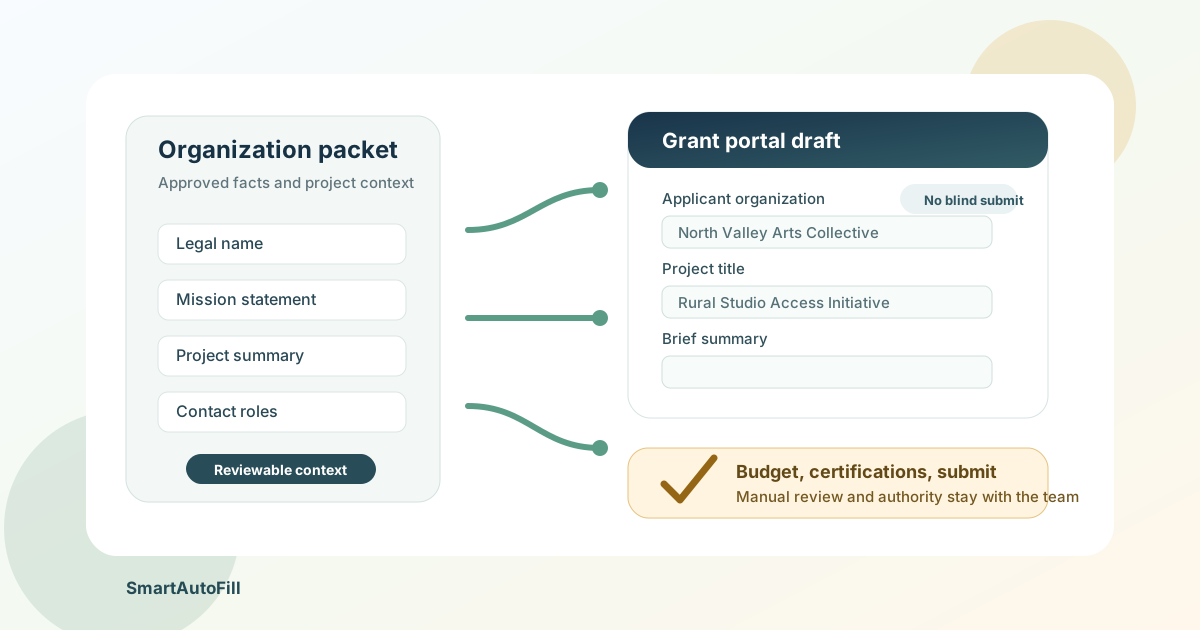
Grant applications are not hard because every field is mysterious. They are hard because the same organization facts, project facts, contact details, budget references, and attachments get retyped across many portals, each with slightly different labels and validation rules.
That makes an AI form filler for grant applications useful, but only in a narrow and responsible way. SmartAutoFill can help draft and fill reviewable browser fields from approved organization and project context. It should not decide eligibility, invent impact claims, certify compliance, choose a budget strategy, attach the wrong document, or click submit.
The goal is not to automate grant seeking end to end. The goal is to reduce repeated browser data entry while preserving the review path that grant applications deserve.
Why grant forms are a good fit for review-first filling
Grant portals ask for a mix of stable facts and judgment-heavy answers. The stable facts are the useful part for a form filler:
- Legal organization name, address, website, UEI, EIN or taxpayer identifier where appropriate.
- Primary contact, project director, grants administrator, and authorized representative details.
- Mission statement, year founded, organization type, service area, and standard program descriptions.
- Project title, project period, requested amount, and short summary after the proposal team has approved them.
- Reusable attachment references, such as a board list, IRS determination letter, audit, budget, or narrative file.
Public grant systems show this pattern clearly. Grants.gov's applicant quick start guide explains that applicants may complete forms online in the browser, download forms, or reuse previously completed forms inside a workspace. The SF-424 instructions ask for organization facts, UEI, contact information, project title, project dates, and estimated funding. Foundation portals often publish application outlines so teams can prepare narrative answers before pasting them into the online form.
In other words, the work has two layers. The proposal team decides what is true, persuasive, eligible, and compliant. A form filler can help move those approved answers into compatible fields for review.
What SmartAutoFill should own
SmartAutoFill is a review-first AI form filler Chrome extension. It scans visible compatible fields on the current page, considers labels and selected user context, drafts values, fills supported controls, and leaves the result on the page for correction and manual submission.
For grant applications, that means SmartAutoFill is most useful when the team already has a clean source of truth:
Organization profile
Legal name: North Valley Arts Collective
Website: https://example.org
Mission: We expand access to community arts education for rural students.
Year founded: 2014
Primary contact: Maya Ortiz, Grants Manager
Project director: Daniel Reed, Program Director
Authorized representative: Elise Tan, Executive Director

Project profile
Project title: Rural Studio Access Initiative
Project period: 2026-11-01 to 2027-10-31
Requested amount: 75000
Service area: Three rural counties in northern California
Short summary: Expand after-school studio access through mobile workshops, teaching artists, and partner school sites.
This kind of context can support ordinary text fields, text areas, dates, and native select controls. If a portal asks "Organization mission," "Project title," "Primary contact email," or "Brief summary," the extension can draft from the approved profile and the user can review the field in place.
That is different from asking the model to write the grant. The application strategy, narrative claims, outcome measures, budget logic, partnerships, and compliance statements still belong to the people responsible for the proposal.
What must stay manual
Grant workflows have a lot of high-stakes fields. Some are legal certifications. Some are budget decisions. Some depend on the funder's rules. Some expose identifiers or financial documents. These should stay manual or inside the grant portal's own review and permission model.
Keep these areas out of casual autofill:
- Eligibility certifications, assurances, lobbying certifications, conflict disclosures, and legal attestations.
- Final authorization by an Authorized Organization Representative or equivalent signer.
- Budget category choices, indirect cost treatment, match commitments, in-kind valuation, and fiscal sponsorship details.
- Government identifiers, tax identifiers, bank details, payment setup, passwords, MFA codes, CAPTCHA, and login flows.
- Narrative claims that require evidence, such as population served, outcomes, evaluation methods, partnership commitments, or need statements.
- File uploads unless the user has intentionally selected the approved material and the input is a compatible native file control.
- Any field where a wrong answer could make the application ineligible, misleading, late, or noncompliant.
SmartAutoFill's current product boundaries match that caution. It does not submit forms. Sensitive controls remain excluded. It works best with ordinary visible browser controls, and custom widgets or iframes may not be fillable. Paid hosted AI Materials can provide richer context and can place one matched material into a compatible native file input, but the user still inspects the selected file and submits manually.
The supported fields and data-handling reference is the source for those limits.
A review-first workflow for proposal teams
Grant teams often already draft outside the portal because browser sessions expire, collaboration is easier in documents, and final answers need review. SmartAutoFill fits after that drafting process, not before it.
- Build the source packet. Keep approved organization facts, project facts, contact roles, budget references, and final narrative snippets in one place.
- Separate reusable facts from decision fields. The legal name can be reused. A certification checkbox should be answered by the responsible signer.
- Open the target grant portal. Confirm the portal, opportunity, deadline, and logged-in profile are correct.
- Use SmartAutoFill on one page or step at a time. Let it draft compatible fields from the selected organization and project context.
- Review every filled field. Edit values, delete uncertain drafts, and leave sensitive or consequential fields blank until the owner handles them.
- Handle attachments deliberately. Use the portal's own checklist and verify file names, versions, formats, and size limits before upload.
- Save inside the portal. Many systems have their own save behavior, session timeouts, and validation warnings.
- Submit manually. The person with authority confirms completeness and clicks submit.
This review-first workflow is slower than a bot, but it is much safer. It reduces repeated typing without removing the proposal review that protects the organization.
Where AI Materials Pro can help
Grant applications are attachment-heavy. A proposal team may have a narrative, budget spreadsheet, board list, IRS letter, audit, logic model, evaluation plan, bios, and letters of support.
AI Materials Pro can help when those materials are used as context for field drafting. For example, a final project narrative can help answer "brief project description" or "expected outcomes" more consistently than a bare profile. A budget narrative can help populate a short "funding use" text area after the finance owner has approved the language.
Be careful with file inputs. SmartAutoFill can match one eligible stored material to a compatible native file input in paid hosted mode, but it does not make every portal upload safe or supported. Many grant portals use custom upload widgets, special file type rules, size limits, required naming conventions, or step-specific attachment categories. The user must inspect the file selection and the portal's upload confirmation.
Also consider retention and minimization. Do not load every confidential document into a general form-filling workflow just because it exists. Use the smallest set of approved materials that helps the current form. Current source limits and paid-plan allowances are listed on SmartAutoFill pricing.
Safe Mode, More Mode, and grant risk
Safe Mode should be the default for grants. These forms often contain legal, financial, or eligibility consequences, and the cost of a plausible but wrong answer is high.
More Mode can be useful on a low-risk draft page when labels are inconsistent and the team is testing coverage. It should not change the review policy. More Mode does not make payment, password, CAPTCHA, government-identifier, identity-verification, or certification fields appropriate for filling. It also does not make a custom grant portal universally compatible.
The Safe Mode and More Mode guide explains how to think about that tradeoff. For a safe dry run, use the AI form filler test page before trying a live grant portal.
When a grant portal, CRM, or RPA is the better tool
A form filler is the wrong layer for some grant operations.
Use the grant portal's own workspace when the task is permission control, collaboration, funder-specific validation, submission history, or official status tracking. Grants.gov, for example, has workspace roles and access controls for organization users. A browser extension should not replace that governance.
Use a CRM or grant management system when the task is pipeline tracking, deadlines, funder relationships, reporting schedules, or award history. SmartAutoFill can help with the last-mile browser form, not the full grants calendar.
Use RPA or API integration only when the process is stable, repeated, internally governed, and worth maintaining. If a nonprofit submits a monthly report through the same portal with the same structured data, a deeper automation might be justified. If each funder has different questions and review needs, a review-first AI form filler is often a better fit. The AI form filler versus RPA guide covers that distinction.
Negative ICP: who should not use this
The negative ICP is important for grant applications. SmartAutoFill is not for teams that want to:
- Mass-submit low-quality applications with generated claims.
- Fabricate outcomes, partnerships, budget details, eligibility, or community need.
- Bypass funder instructions, workspace permissions, signer authority, CAPTCHA, MFA, or submission controls.
- Fill payment, bank, password, government-identifier, or legal certification fields without a responsible reviewer.
- Treat AI-generated proposal language as evidence.
- Upload confidential documents broadly without checking relevance, permissions, retention, and the portal category.
Those users are not just a poor fit. They make the grant process worse for funders and legitimate applicants.
A practical buying checklist
Before using any AI form filler on grant applications, ask:
- Does the team have an approved organization profile and project profile?
- Which fields are routine facts, and which fields are certifications, budget decisions, or narrative claims?
- Who owns final review for organization facts, program narrative, finance, attachments, and submission?
- Are the target portals ordinary browser forms, custom widgets, PDFs, iframes, or file-heavy workflows?
- What material sources are appropriate to use as context, and which documents should stay outside the filler?
- Can the team test the workflow on a sample form before a deadline-sensitive application?
- Does everyone understand that SmartAutoFill fills drafts for review and never submits the application?
The answer does not have to be "use it everywhere." A good first use case might be an internal draft portal, a lower-stakes foundation application, or a repeated organization profile section. Once the team trusts the review process, it can expand carefully.
Bottom line
AI form filler for grant applications makes sense when the proposal team already has approved source material and wants to reduce repeated browser typing. Use SmartAutoFill for organization facts, project context, contact details, and reviewable summaries. Keep eligibility, budgets, certifications, attachments, and final submission under human control.
That is the responsible position for a grant workflow. It gives proposal teams a faster way through repetitive forms without pretending that grants are just data entry. Start with the AI form filler overview, test a safe sample on the public demo form, and compare field support against the data-handling reference before using a live portal.