
Technology partner programs ask for much more than a company name and email address. A serious application may cover your services, regions, customer profile, technical expertise, integration plans, capacity, differentiators, and the business case for working together.
That creates an awkward operational problem. Much of the information already exists in sales decks, security documents, partner briefs, or earlier applications, but copying it into every portal is slow. At the same time, the answers are consequential. A stale customer count, an unauthorized client reference, or a casually accepted agreement can become part of a commercial relationship.
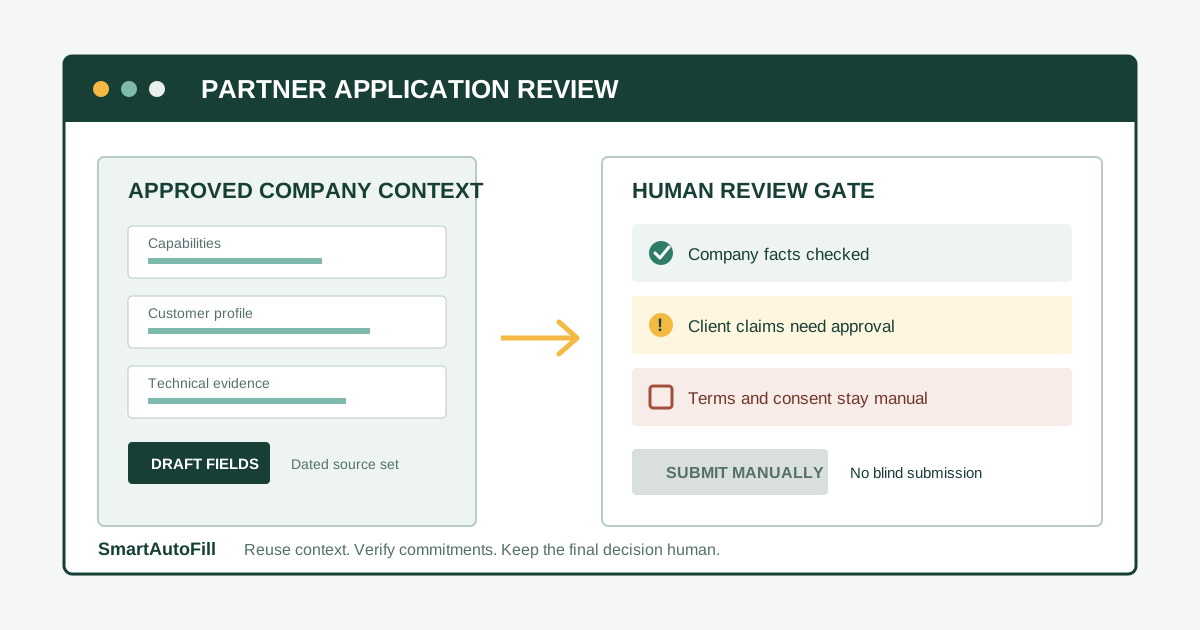
An AI form filler for partner program applications is useful when it reduces repeated drafting without taking over judgment. SmartAutoFill can draft and fill compatible, reviewable browser fields from approved company context. It does not navigate the application for you, accept terms, or submit the form. The applicant remains responsible for sensitive, legal, financial, password, payment, consent, and final-submission decisions.
Who this workflow is for
The strongest fit is a business applying selectively to programs that match a real go-to-market or delivery strategy:
- an agency applying to become an implementation or consulting partner;
- a SaaS vendor pursuing a technology or integration partnership;
- a managed service provider documenting technical coverage and customer fit;
- a reseller or consultancy applying to a small set of relevant vendor programs; or
- a business-development team that needs consistent company answers across partner portals.
The operative word is selectively. This workflow is for teams that can explain why each program matters and can support every claim they make.
The negative ICP is equally important: this workflow is not for mass applications, fabricated certifications, invented customer relationships, scraped contact details, CAPTCHA or MFA bypass, credential stuffing, blind acceptance of program terms, or automatic submission. SmartAutoFill is also not a password manager or a payment autofill tool.
Why partner applications are unusually demanding forms
Official partner applications show how quickly the scope expands beyond basic contact data.
Google's Meridian Partner Program interest form asks applicants to describe their client base, examples of relevant client work, technical expertise, capabilities, capacity, goals, and desired support. The Zoho Consulting Partner signup asks about business details, expertise, company registration, and relevant product experience before human review. OpenText's partner application goes further into company profile, objectives, territory, differentiation, prior projects, training, budgets, and forecasts.
These are not interchangeable questionnaires. They mix at least four kinds of data:
- Stable company facts: legal or trading name, website, headquarters, regions, and broad service categories.
- Reusable operating context: expertise, delivery model, target customer, implementation capacity, and supported technologies.
- Evidence that changes: customer examples, certifications, headcount, revenue bands, pipeline, forecasts, and current integrations.
- Program-specific judgment: why this partnership fits, what you plan to build or sell, which customers benefit, and what support you need.
A useful workflow reuses the first two categories carefully, dates and verifies the third, and writes the fourth for the specific program.
Build a partner application packet before opening the portal
Do not make the browser form your source of truth. Prepare a short, approved partner application packet first. It should be readable by a human and dated so reviewers know when the facts were checked.
A practical packet can include:
| Section | What to prepare | Review owner |
|---|---|---|
| Company profile | Approved description, website, locations, company type | Business operations |
| Services and expertise | Delivery capabilities, products supported, technical specialties | Practice or product lead |
| Customer profile | Industries, company sizes, regions, approved examples | Sales or account owner |
| Partnership thesis | Why this program, shared customers, proposed integration or service | Partnership owner |
| Capacity and coverage | Team size or capacity statement, languages, territories, support model | Delivery lead |
| Evidence | Certifications, case studies, integration notes, approved attachments | Relevant document owner |
| Restricted facts | Revenue, forecasts, tax details, client names, confidential metrics | Finance, legal, or executive approver |
Write down boundaries in the packet as well. For example: “Do not name clients without written approval,” “Use the current certification list only,” or “Leave forecasts blank for finance review.” A blank field is safer than a plausible but unsupported answer.
This packet is also where you can decide whether an attachment is approved for external sharing. A sales deck, security summary, case study, and company registration document may have very different audiences.
A review-first partner application workflow
1. Qualify the program before filling anything
Confirm the partner type, eligibility rules, commercial model, required certifications, geographic coverage, and expected commitments. Determine whether the program serves your actual customers and whether your team can meet its obligations.
This is a business decision, not a form-filling task. An AI filler should not decide that a program is strategically appropriate just because the application is accessible.
2. Create a dated source set
Gather only approved materials: the partner packet, current service descriptions, public website copy, approved case studies, and the specific application guidance. Remove obsolete versions and note the “current as of” date for metrics that can change.
If several people contribute, assign an owner for each high-risk fact. That makes it clear who must confirm a client disclosure, revenue band, certification, or forecast before submission.
3. Configure the smallest useful profile
In SmartAutoFill, store the company context needed for the application rather than an indiscriminate archive of internal documents. Separate reusable company information from restricted details that require case-by-case approval.
Use Safe Mode when the page is straightforward and you want conservative field matching. Consider More Mode only when ordinary labels are not enough and you are prepared to review more broadly inferred answers. Neither mode changes the responsibility boundary: generated values are drafts, not verified declarations.
If you use SmartAutoFill's hosted provider, each fill uses hosted credits according to the current pricing and credit options. AI Materials Pro can add approved source material to the context and can match one eligible stored file to a compatible native file input. File handling is not universal, custom upload widgets may not work, and custom-provider mode does not include AI Materials or file filling.
4. Test the behavior away from the live application
Use the public AI form filler test page to check your profile and wording before entering a real partner portal. This exposes vague source material without putting an unfinished answer into a consequential form.
Review whether the generated company description is current, whether service claims are specific enough, and whether the profile clearly distinguishes approved public examples from confidential client information.
5. Fill compatible fields, then stop and inspect
Open the real application and use SmartAutoFill on the visible page. It can fill compatible native controls with reviewable values. It does not navigate between steps or submit the application.
Inspect every filled field against the partner packet. Pay special attention to:
- company category and partner type;
- client counts, regions, and market segments;
- certifications and technical competencies;
- customer names or project examples;
- employee counts, revenue bands, budgets, and forecasts;
- product integration descriptions; and
- claims about capacity, support coverage, or future commitments.
Some interfaces use custom widgets, iframes, radio groups, or checkbox controls that are not filled reliably or are intentionally left for manual handling. The supported fields and data-handling reference explains the current boundaries.
6. Write program-specific answers deliberately
Repeated company context can be reused. The partnership thesis should not be generic.
A useful program-specific answer connects three facts:
- the customers or workflow your company already serves;
- the vendor capability or ecosystem gap that matters to those customers; and
- the concrete integration, service, or go-to-market motion you can support.
Do not inflate the answer with imagined pipeline, unnamed “enterprise demand,” or capabilities that are still aspirational. A narrow, supportable proposal gives a partner manager more to evaluate than a broad claim about mutual growth.
7. Handle sensitive fields and agreements manually
Pause when the application reaches legal entity details, tax identifiers, banking or payment information, passwords, security attestations, declarations, consent checkboxes, or contractual terms. Route those fields to the authorized owner.
The same rule applies to client disclosure. A customer relationship may be real and still be confidential. Confirm that the person completing the application has permission to name the client and describe the work.
8. Perform a final human review and submit yourself
Compare the full form with the dated source set. Check attachments, spelling, current metrics, URLs, contact ownership, and any answer generated from context. Confirm that the person accepting terms has authority to do so.
Then submit manually. SmartAutoFill avoids unsafe blind submission by design. The final click should remain a conscious business action.
A field-by-field decision rule
Use this simple classification while reviewing the application:
Fill and verify: approved company description, website, office locations, public service categories, supported technologies, and reusable capability statements.
Draft, then rewrite for the program: partnership goals, differentiation, integration plan, shared customer value, enablement needs, and proposed go-to-market activity.
Confirm with an owner: customer references, certifications, delivery capacity, headcount, revenue ranges, budgets, forecasts, and current pipeline.
Enter manually or leave blank until authorized: legal declarations, tax IDs, bank or payment data, passwords, consent, agreement acceptance, security attestations, and final submission.
This approach is more conservative than filling every available field, but it produces a cleaner audit trail and fewer accidental promises.
SmartAutoFill versus RPA for this job
Partner applications are usually low-volume and high-consequence. The portal can change, the questions differ by program, and several answers require current human judgment. That makes a review-first browser assistant a better fit than unattended automation for many teams.
The detailed comparison in AI form filler versus RPA explains the distinction. RPA may be appropriate for stable, governed internal processes with tested selectors and explicit exception handling. It is a poor default for third-party portals when the goal is to apply broadly and auto-submit.
SmartAutoFill is intentionally narrower. It helps prepare visible fields for review while leaving navigation, exceptions, agreements, and submission with the user.
Privacy and access questions to ask before adoption
Before using any AI form tool on partner applications, ask:
- Which source materials are approved for the tool?
- Does the profile contain client or employee information that should be removed?
- Who can update the company context?
- How will dated metrics and certifications be retired?
- Which fields must always stay manual?
- Who verifies attachments before external sharing?
- Who has authority to accept the program's terms?
Start with the SmartAutoFill privacy and safety guide and the product's field support and data-handling details. Your own legal, security, and client-confidentiality obligations still apply.
The buying decision
SmartAutoFill is a sensible option when your team has approved company context, applies to a limited number of relevant partner programs, and wants to reduce repeated typing while preserving review. It is especially useful when open-text fields require context that ordinary browser autofill cannot provide.
It is not the right tool when the desired outcome is unattended portal navigation, mass applications, automatic checkbox acceptance, password or payment entry, CAPTCHA bypass, or final submission without review.
That boundary is the product value, not a missing feature. Partner applications create commercial commitments. The useful automation is the part that helps your team carry accurate context into the form and leaves the consequential decisions visible.
Read the AI form filler product overview, review pricing, and test the workflow on the public sample form before using it on a live partner application.