
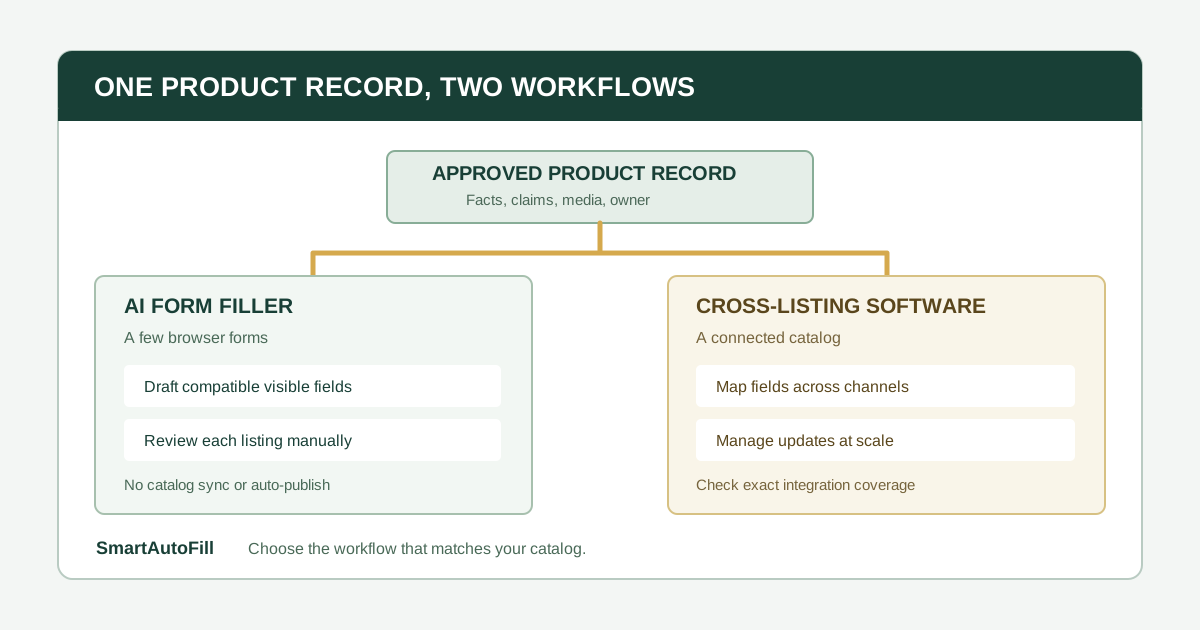
An online seller may enter the same product title, dimensions, materials, and description into several admin pages. It is tempting to call every tool that reduces this work a “listing automation” tool. The buying decision is more specific: do you need help with a few browser forms, or do you need one catalog that publishes and maintains listings across channels?
An AI form filler vs cross-listing software comparison starts there. SmartAutoFill helps a person draft and fill compatible visible fields on the page in front of them, using a selected saved profile or context. The person reviews the values and publishes manually. Cross-listing software is built around channel mapping and distribution from a shared product record. These are different stages of a seller's workflow.
The answer in one minute
Choose a review-first form filler when you have a small number of products, approved source details, and a browser form whose text fields you want to complete with human review. Check that the particular form uses controls the extension can fill. Use it for drafting and applying reviewable fields, not for promises about automatic publication.
Choose cross-listing or native catalog tools when you must publish many products, map categories or variants across supported channels, keep prices and stock aligned, or update listings in bulk. A form filler does not maintain a catalog or synchronize changes after a listing goes live.
The target ICP for SmartAutoFill here is a small seller, product marketer, or operations lead entering a handful of distinct products into forms that still require individual judgment. The negative ICP is a seller seeking mass duplicate listings, fabricated product claims, restricted-product evasion, account or CAPTCHA bypass, automatic credential or payment entry, or unreviewed publishing.
What the platforms actually ask for
A product listing is more than a paragraph. Shopify's product documentation describes titles, descriptions, media, pricing, inventory, variants, tags, and custom fields. It also documents native bulk editing and CSV workflows. Etsy's listing guide describes category-specific attributes, photos, variations, pricing, shipping, and a final Publish action.
Those field groups have different sources of truth. A product spec can support materials and dimensions. Inventory comes from a stock system. Price needs the current channel strategy. Shipping depends on fulfillment. Photos need correct rights and product matching. Category and policy decisions belong to the seller.
The key buying question is therefore not whether a tool can type a description. It is whether its operating model covers the rest of the listing lifecycle you actually need.
What cross-listing software buys you
Cross-listing products maintain a product record and translate parts of it into channel-specific fields. For example, Crosslist describes a universal listing form that maps shared attributes to connected marketplaces and publishes listings from that record. Those are the vendor's stated capabilities; test the exact channels and field coverage before relying on them.
This category becomes attractive when your work is organized around a catalog rather than a single open page:
- you have enough SKUs that entering each one separately is an operating burden;
- the same inventory is offered through multiple connected channels;
- prices, stock, and descriptions need coordinated updates;
- a team needs a durable product record and approval process; or
- channel-specific categories, attributes, and variants must be mapped repeatedly.
The tradeoff is setup and coverage. A supported channel may still have exceptions. A marketplace outside the tool's integrations may need manual work. Ask for a field-level demo using one of your real products, including variations, images, shipping, and a later edit. Do not treat a logo on an integrations page as proof that every listing field synchronizes.
If you sell only in one store, check its native features first. Shopify documents bulk editing and CSV changes; a dedicated cross-listing subscription may not be necessary for a single-channel catalog.
What a form filler can do instead
SmartAutoFill is a Chrome extension for the current browser page. It reads visible compatible fields and their nearby labels, uses selected profile or context material to draft values, and applies supported values into the form for review. It does not navigate between listing steps, map categories across marketplaces, manage inventory, maintain synchronization, or click Publish.
That narrower scope can still help in a real selling workflow. Suppose a manufacturer has three specialized products and an approved product sheet for each. One marketplace asks for a short technical summary, another for a material description, and a third for an intended use. A person can choose the correct product context, draft answers for compatible text inputs, then check each answer against the underlying spec and the destination's rules.
The important qualifier is compatible. Product editors often use rich-text widgets, custom category pickers, media galleries, variant builders, and embedded controls. SmartAutoFill does not guarantee support for those interfaces. It is most reliable with ordinary visible browser controls; the supported fields and data-handling reference explains the current limits.
Start with an approved product record
Before trying either type of tool, create one product record that a human can verify. It can be a short sheet rather than a full product information management system.
| Field | Source of truth | Review question |
|---|---|---|
| Product identity | SKU, model, manufacturer, approved name | Is this the exact item and version being sold? |
| Physical facts | Dimensions, weight, materials, included components | Are units and variant differences correct? |
| Customer wording | Approved description, use cases, care instructions | Does this claim apply to this channel and audience? |
| Evidence | Certifications, testing, warranty, origin claims | Is the evidence current and permitted to share? |
| Commercial data | Price, tax treatment, stock, lead time, shipping | Has the responsible owner approved current values? |
| Media | Approved images or video for this exact product | Does each file depict the right item and have usage rights? |
Date the record and name an owner. A copied description cannot repair a wrong SKU, stale stock count, or unsupported safety claim. If product information changes, update the record before using it in another form.
A field-by-field review workflow for a small catalog
1. Check the destination's rules
Read the marketplace's category rules, prohibited claims, image requirements, and shipping or return policies. Confirm that the product is allowed. If a listing form branches after choosing a category, make that choice yourself and review the fields it reveals.
2. Select only the relevant product context
Use a separate saved context for each product or product family. Avoid a single profile containing several similar SKUs, because a plausible answer from the wrong item is harder to spot than a blank field. Do not put passwords, card data, bank details, or unnecessary customer information into the context.
In hosted mode, SmartAutoFill uses credits under the current pricing options. Paid hosted AI Materials Pro can use approved selected materials as context. It can place one eligible stored file into a compatible native file input when there is a clear match. That is not a bulk image uploader: product listings often require several photos, ordered media, or custom galleries, which should be handled manually. Custom-provider mode does not include AI Materials or file filling.
3. Test the behavior before a live listing
Use the public AI form filler test page to check your product wording and selected context. Then inspect the real listing editor to see which fields are ordinary supported controls. If a key field is a custom widget, plan to enter it yourself. Do not infer compatibility from the fact that the page is open in Chrome.
Safe Mode is the conservative starting point. In hosted mode, More Mode can consider additional supported candidates during planning, while the same sensitive and unfillable guards still apply. The Safe Mode and More Mode guide describes when to switch. Neither mode verifies a product claim for you.
4. Fill, inspect, and correct
Apply the draft to compatible visible fields and compare every value with the approved product record. Watch for unit conversion, copied variant names, country-of-origin claims, warranty wording, and price or stock fields. A confident-sounding description is not evidence that an attribute is true.
Complete categories, variants, multiple images, inventory, shipping, restricted-product declarations, and any legal or payment fields manually or in the dedicated system that owns them. If a native file input receives a selected AI Materials file, inspect the actual filename and content before proceeding.
5. Preview and publish yourself
Review the buyer-facing preview, shipping promise, total price, media order, and channel rules. SmartAutoFill drafts and fills reviewable fields and avoids unsafe blind submission. The seller remains responsible for sensitive, legal, payment, password, consent, and final publication decisions.
A buying checklist for the two tool categories
Run the same product through each candidate tool and answer these questions:
- How many products and channels will we manage this quarter?
- Is there an integration for every destination, or will some products still need browser entry?
- Which fields are mapped automatically, and which require a channel-specific decision?
- Can we preview a draft before it becomes public?
- Who owns corrections when a product fact changes after publication?
- Does the tool synchronize price and stock, or only create initial listings?
- How are images, variants, category attributes, and restricted claims handled?
- Can we keep credentials, payment data, and customer details outside the drafting context?
A form filler should pass the current-page and field-by-field review test. Cross-listing software should pass the catalog synchronization and correction test. If your main pain is maintaining hundreds of active listings, the latter matters more. If your task is completing a few unusual browser forms from verified product facts, review-first assistance may be enough.
See the SmartAutoFill product overview, compare pricing, and try the sample form before using it with a live product listing.