
RFP work rarely fails because one person cannot type fast enough.
It usually gets painful because the answer already exists somewhere else. A company profile. A proposal draft. A security overview. A pricing note. A previous response. A PDF, a policy page, or a spreadsheet. Then the buyer asks the team to re-enter pieces of that answer inside a procurement portal with strict fields, character limits, dropdowns, file inputs, and final declarations.
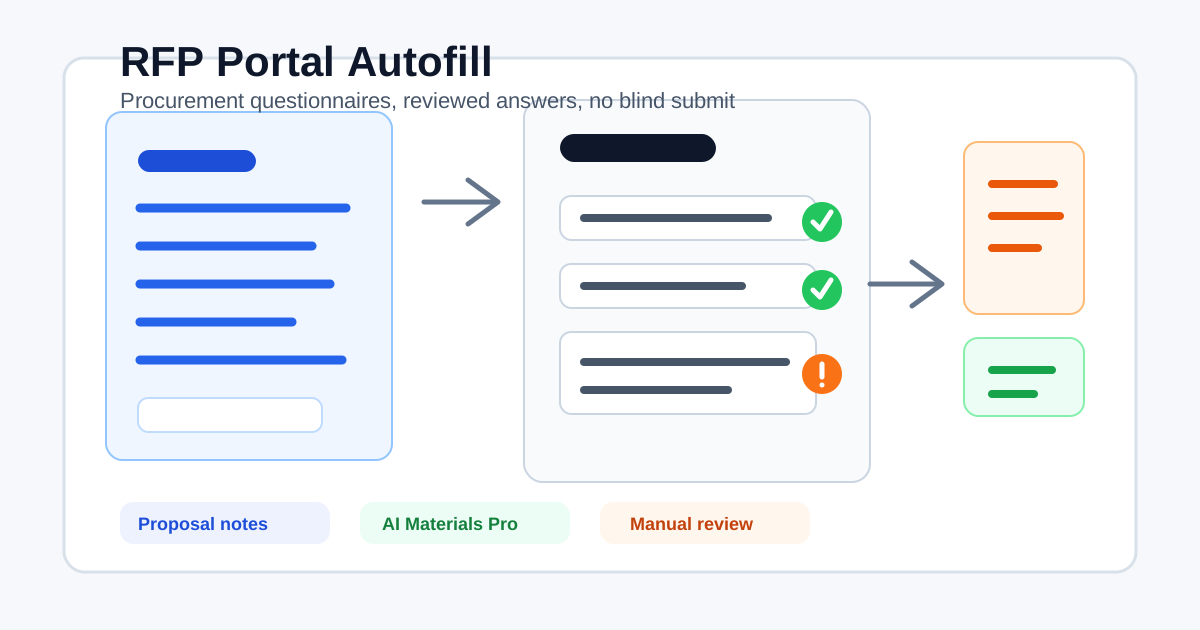
That is a narrow but valuable job for an AI form filler. SmartAutoFill is not an RFP management platform, a bid writer, or a substitute for legal and sales review. It is a Chrome extension that drafts and fills compatible fields from your saved profile, scenario context, and selected materials so you can review the portal before you submit.
For proposal teams, that distinction matters.
Why RFP portals create a specific kind of friction
Procurement portals help buyers standardize submissions. They also push a lot of hidden labor onto vendors.
GSA explains RFIs, RFQs, and RFPs as different request types: RFIs gather market information, RFQs collect pricing for clearer needs, and RFPs ask vendors to explain a complete solution. That is why a response is more than a basic contact form.
The same pattern shows up in public procurement documentation. The UK Government Commercial Function's procurement-specific questionnaire template is designed to collect core supplier information, additional exclusions and debarment information, and details tied to conditions of participation.
Proposal software vendors see the pain from the response-team side too. Loopio's 2026 article on online RFP portals describes the common vendor problem: teams move answers from drafts or proposal systems into rigid portal fields, which creates copy-paste work and error risk.
That is the real search intent behind terms like "RFP portal autofill," "procurement questionnaire automation," and "AI form filler for proposal teams." The user is not looking for a toy autocomplete. They are trying to move approved business context into a serious web workflow without losing control.
ICP: who this workflow is for
This article is for people who already have real answers and need help placing them into forms.
Good fits include:
- Proposal managers filling buyer portals after the response draft is approved.
- Sales engineers moving technical answers into portal questionnaires.
- Founders and small sales teams responding to enterprise procurement forms without a full RFP operations stack.
- Supplier administrators maintaining company profiles across procurement systems.
- Customer success or partnerships teams completing qualification forms for strategic accounts.
- Operations teams filling repeat vendor, partner, or procurement intake forms.
The buying trigger is often a sentence like this:
"We have the answer in our proposal doc, but the buyer portal wants it split across 47 fields."
That is where browser-level form filling helps. It does not own the bid. It shortens the transfer step.
Negative ICP: who should not use it
SmartAutoFill is not for gaming procurement.
Do not use an AI form filler to:
- Invent qualifications, certifications, insurance coverage, customer references, or financial claims.
- Submit a bid for a buyer relationship you are not authorized to pursue.
- Fill legal declarations, conflict-of-interest answers, exclusions, sanctions, or compliance confirmations without review.
- Guess pricing, discount terms, delivery commitments, or contract exceptions.
- Upload confidential documents to the wrong portal.
- Fill passwords, payment fields, bank details, verification codes, government identifiers, CAPTCHA, signatures, or consent checkboxes.
- Auto-submit portal pages without a responsible person reading them.
RFPs and procurement questionnaires are decision records. Some fields affect legal standing, bid compliance, pricing, and buyer trust. Those fields should slow you down.
What SmartAutoFill can help with
The useful part is the repetitive middle of the response.
SmartAutoFill can draft and fill compatible fields such as:
- Company name, website, headquarters, size, founding year, and business category.
- Primary sales, billing, support, privacy, or security contact.
- Short company overview.
- Product or service summary.
- Relevant industry, region, or customer segment when supplied.
- Implementation approach copied from approved notes.
- Support model, availability, and escalation path.
- Security or data-handling summaries based on saved materials.
- References to policy URLs, trust pages, documentation, or standard attachments.
- Plain-text answers to qualification questions where the source context is clear.
- Native single-select fields when the correct option is visible and unambiguous.
It is especially useful when the buyer portal breaks a polished answer into pieces:
- "Describe your solution."
- "Explain your implementation approach."
- "List your support hours."
- "Provide your data-processing location."
- "Summarize your relevant experience."
- "Attach evidence, if applicable."
A snippet can help if the wording is fixed. Browser autofill can help with basic identity fields. SmartAutoFill is useful when the field needs a reviewed answer from current context, not a memorized string.
For the adjacent tool decision, read the text expander vs AI form filler comparison.
What should stay manual
Use manual review for anything that changes the business risk of the bid.
Keep these fields out of casual autofill:
- Pricing, discounting, payment terms, and renewal terms.
- Legal representations and warranties.
- Acceptance of terms and conditions.
- Data protection, security, and compliance claims that need exact evidence.
- Insurance coverage and financial information.
- Conflicts of interest, sanctions, exclusions, debarment, or anti-bribery declarations.
- Customer references that require permission.
- File uploads when the requested document is not an obvious match.
- Final certification, signature, and submit actions.
SmartAutoFill drafts and fills reviewable fields on the page. It does not submit for you. The person sending the response remains responsible for the portal content.
How to set up a good RFP autofill profile
A clean profile is more useful than a giant pile of copied old answers.
Start with stable company facts:
- Legal company name and common brand name.
- Website and product URLs.
- Headquarters and operating regions.
- Employee count or company size band, if you use one consistently.
- Business description in one sentence and one paragraph.
- Standard contacts: sales, support, billing, privacy, security, and procurement.
- Links to trust, privacy, subprocessors, support, API docs, and status pages.
Then add a scenario for the kind of response:
Scenario: Enterprise SaaS procurement response.
Use concise buyer-facing language.
Use only supplied facts.
Do not invent certifications, customer references, pricing, legal terms, security controls, or delivery commitments.
Leave final declarations and signatures for manual review.
For paid hosted workflows, add AI Materials Pro sources only when they are relevant:
- Approved company one-pager.
- Product overview.
- Implementation plan.
- Support or SLA summary.
- Security overview.
- Privacy policy or DPA summary.
- SOC 2 or ISO summary when appropriate.
- Standard RFP answer library in Markdown or PDF.
SmartAutoFill can use pasted text, the current page, website URLs, PDFs, Markdown, PNG, JPEG, and WebP sources as context. It does not expose DOC or DOCX uploads as supported materials. In paid hosted mode, it can place one clearly matched material into a compatible native file input, but you still need to inspect the selected file before submitting. The current limits live in the supported fields and data-handling reference.
Safe Mode vs More Mode for procurement work
Use Safe Mode for real buyer portals by default.
RFP forms often mix ordinary fields with fields that carry legal, pricing, compliance, or certification risk. Safe Mode keeps planning conservative and makes skipped fields visible for manual attention. The workflow is review first, no blind submit.
More Mode can help in low-risk drafts, internal procurement practice pages, or portals where you want hosted planning to consider more supported candidates. It does not make sensitive fields safe. It does not make radio buttons, checkboxes, passwords, payment fields, CAPTCHA, signatures, custom widgets, or iframes supported.
The practical rule is this:
- Use Safe Mode when a buyer, government agency, or enterprise procurement team will rely on the answer.
- Use More Mode only when the page is low-risk, the source context is strong, and a human will review every field before submission.
For the mode details, read the Safe Mode vs More Mode guide.
Where a full RFP platform still wins
SmartAutoFill is a browser filling assistant. That makes it flexible, but it does not replace tools built for the full proposal process.
A dedicated RFP or proposal platform is a better fit when you need:
- A governed answer library with owners and review cycles.
- SME assignment and approval routing.
- Version history across many contributors.
- Bid calendars and deadline management.
- Win/loss analytics.
- Redline workflows and formal proposal assembly.
- Deep integrations with your CRM, storage, and proposal system.
SmartAutoFill fits a different layer. It helps when the final destination is still a web form and your team has to move approved context into that form. It can sit beside a proposal platform, a shared document, or a lightweight internal answer library.
In other words: use proposal software to manage the response. Use SmartAutoFill when the response has to be typed into a browser.
A practical RFP portal workflow
Here is a clean way to use SmartAutoFill without turning procurement into a guessing exercise.
- Prepare or approve the source response outside the portal.
- Save a SmartAutoFill profile with stable company facts.
- Add a scenario that tells the tool what not to invent.
- Add only relevant AI Materials Pro sources for this response.
- Open the buyer portal and scan the page.
- Apply the draft to compatible fields.
- Read every filled answer in the portal.
- Manually handle pricing, legal, compliance, declarations, signatures, and final submit.
- Save a copy of what was submitted in your normal proposal records.
Before using a real buyer portal, test the behavior on the public AI form filler test page. If your team is evaluating hosted credits, materials limits, and paid usage, review the SmartAutoFill pricing page.
Example: from proposal notes to portal fields
Imagine your approved proposal notes say:
SmartAutoFill is a Chrome extension for review-first AI form filling.
It helps users fill compatible visible web form fields from saved profiles,
selected scenarios, and paid AI Materials Pro sources. It skips sensitive
fields during actual filling, does not submit forms, and leaves the user
responsible for final review.
A procurement portal may split that into:
- Company or product description.
- Primary use case.
- Supported browser.
- Data-handling summary.
- Support contact.
- Security contact.
- Evidence links.
- Attachment request.
- Final certification.
SmartAutoFill can help draft the product description, use case, browser, data-handling summary, contacts, and evidence-link fields when the source context is present. It should leave final certification, signatures, and risky attachment choices for human review.
That is not a compromise. It is how serious form filling should work.
Bottom line
RFP portals are built around structured submission. Proposal teams are built around documents, answer libraries, subject-matter review, and judgment. The hard part is moving verified context from one world into the other.
SmartAutoFill helps with that transfer step. It drafts and fills compatible fields in Chrome, uses saved profile/context and selected materials, supports hosted credits, and keeps the page reviewable before submission.
Use it for the repeated, evidence-backed parts of procurement questionnaires. Keep legal, pricing, certification, payment, password, identity, consent, and submit actions manual.
That is the difference between faster proposal work and risky automation.