
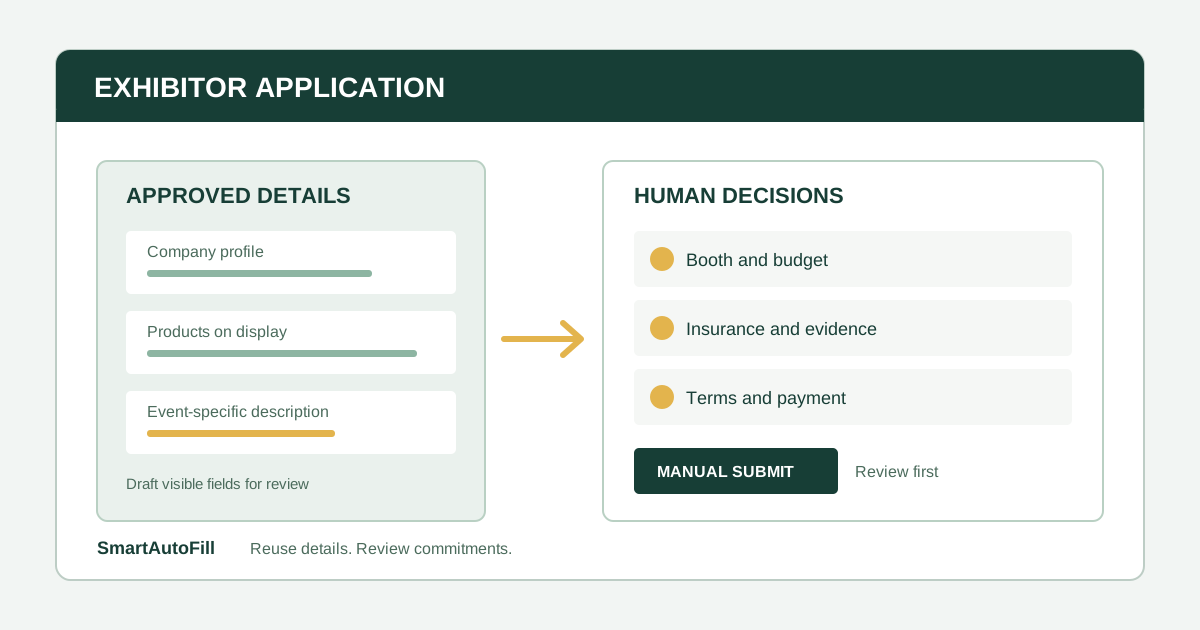
An exhibitor application can look like a company profile at the top and a contract at the bottom. The first screen asks what your business does. Later screens may ask which products will be displayed, where the booth should go, what it will cost, how you will pay, and whether you accept the show's rules.
That mix is why an AI form filler for trade show exhibitor applications needs a narrow job. SmartAutoFill can draft and fill compatible, reviewable browser fields from approved company context. It does not choose a booth, accept terms, authorize a payment, or submit the application. A person must review the result and make those decisions.
Who should consider this workflow?
The target customer is an event or field marketing team applying to a small number of relevant shows. It may also be a manufacturer, distributor, agency, or founder handling its own exhibitor applications. These teams already have an approved company description and product catalog, but each organizer asks for the information in a different web form.
The business intent is concrete: qualify the show, reserve suitable space, present accurate products, and avoid retyping approved facts. The trust path runs through a dated source packet, review by the product and event owners, and a deliberate contract decision before submission.
The negative ICP is a team trying to send bulk applications to unrelated shows, claim products it does not sell, evade eligibility rules, use another company's identity, bypass login or CAPTCHA controls, autofill payment credentials, or accept contracts without authorization. SmartAutoFill is not a tool for any of those jobs.
Why this is more than a contact form
The Grocery & Specialty Food West exhibitor space application illustrates the split. It asks for company and contact details, business category, represented product categories, competitors, booth preferences, space size, costs, and payment method. Its terms address acceptance, payment requirements, and insurance. Those sections have different owners and different consequences.
An organizer may also ask for a public directory description. Do not assume the product description in the space application will be reused in the event directory. On the organizer's form, the answer about what you exhibit is used to assess eligibility and space assignment; marketing copy for an attendee-facing listing may be a separate task. Read the label and its purpose before inserting a saved answer.
The form also changes over time. A booth preference can become unavailable. Rates and deadlines can move. Your product lineup can change. Reusing text is valuable only when the source is current and the answer fits the question asked today.
Assemble an exhibitor application packet
Before opening the portal, make a one-page packet that the event owner can approve. Treat it as an input to review, not as permission to submit.
| Packet section | What to include | Who should check it |
|---|---|---|
| Company identity | Approved legal name, public brand, website, address, primary contact | Operations |
| Exhibitor fit | Product and service categories, what will actually be displayed, eligible business type | Product or sales lead |
| Public wording | Short company summary and product description for external use | Marketing |
| Show plan | Target audience, goals, staffing, demo needs, and logistical constraints | Event owner |
| Booth decision | Preferred location, minimum area, accessibility and power needs, approved budget range | Event owner and finance |
| Supporting materials | Approved logo, product sheet, insurance evidence if requested | Asset owner and legal or risk owner |
| Restricted details | Tax, payment, banking, signature, legal declarations, and contract authority | Finance or authorized signatory |
Date the packet. Mark claims that need confirmation, such as a new product launch, a certification, an exclusive distribution right, or a planned demonstration. If the claim is still pending, keep it out of the form.
For a company that attends several shows, keep a common company section and a separate show-specific page. The common section reduces repetition. The show page records the event's rules, audience, deadlines, exhibit restrictions, and approved budget. This prevents a generic saved profile from silently answering a question about a particular show.
A review-first application workflow
1. Qualify the event
Check whether your products fit the show's eligibility rules and whether the expected audience justifies the spend. Confirm the organizer, official application URL, event date, location, booth inventory, deadline, and cancellation terms. If an application requests payment, make sure the event owner has confirmed it is the intended purchase.
This decision precedes any autofill. A completed form cannot make an unsuitable show worthwhile.
2. Prepare approved context
Use the exhibitor packet to create a focused SmartAutoFill profile or context. Include stable company facts and approved product wording. Leave payment details, passwords, confidential pricing, sensitive identifiers, and unapproved product claims out of it.
If you use hosted SmartAutoFill, filling consumes hosted credits under the current pricing options. Paid hosted AI Materials Pro can use selected approved materials as context. Where a compatible native file input has a clear match, it can place one eligible stored material into that input. Do not assume it can populate every custom upload control or attach a full set of product images. Custom-provider mode does not include AI Materials or file filling.
3. Test before the live portal
Try the public AI form filler test page with the selected company context. Check whether the generated description uses the right legal name and whether product categories are supported by the source material. This is a quick way to catch stale or vague context before it appears in an organizer's application.
Start with Safe Mode for conservative field matching. More Mode can consider more supported candidates in hosted mode, but it still respects sensitive and unfillable field guards. Neither setting turns a draft into a verified declaration. The Safe Mode and More Mode guide explains the difference.
4. Fill ordinary fields and inspect each one
Open the live application and fill only the visible compatible fields. SmartAutoFill can help with contact details, company description, and product or service wording when the saved context supports the answer. Review every value against the packet and the question's stated use.
Some controls need manual handling. Radio buttons, checkboxes, custom widgets, embedded frames, and unusual multi-step interfaces may not be filled. The field support and data-handling reference gives the current boundaries. Do not try to infer success from the absence of an error; inspect the page.
5. Stop at the booth decision
Booth size and location are commercial choices, not reusable company facts. Compare the floor plan, traffic goals, space requirements, accessibility needs, setup rules, and total estimated cost. A corner upgrade or premium area may change the budget. If the portal recalculates a price, verify the amount after making the selection.
Keep this step with the event owner and finance reviewer. SmartAutoFill should not infer a booth number from a previous show, copy last year's budget, or select an optional package without current approval.
6. Review evidence, terms, and payment manually
Check every upload for the right version and audience. A public logo and a product sheet are different from an insurance certificate or legal registration document. If the portal supports a native file input and the hosted AI Materials feature proposes a matching file, verify the actual selected file before proceeding.
Read the organizer's agreement, cancellation rules, insurance requirements, deadlines, and payment schedule. The exhibitor application cited above shows how a routine space request can become a binding contract. An authorized person should enter payment information, handle consent, sign or accept terms, and submit the application. SmartAutoFill avoids unsafe blind submission.
What to reuse, and what to decide anew
Use a simple classification for each field:
- Reuse after checking: legal or trading name, public website, approved address, basic contact details, stable service categories.
- Draft and edit: a description of the products being exhibited, a short company introduction, and an explanation of fit with the show's audience.
- Confirm for this event: actual display products, launch dates, staff coverage, booth size, space preference, upgrade options, and any figures tied to this year's budget.
- Handle manually: sensitive identifiers, payment and password fields, legal representations, insurance declarations, consent, signatures, contract acceptance, and final submission.
This distinction also helps when multiple people own the application. Marketing can approve copy, product can confirm claims, the event owner can decide on space, and finance or legal can review obligations. The final reviewer can see which answers came from approved context and which require a fresh decision.
When another approach fits better
If your team manages a large, stable internal event database and repeatedly sends the same structured information through a supported integration, an API or governed automation may be more suitable. The AI form filler versus RPA guide compares those approaches.
If you need to design a new registration form for your own event, a form builder is a different category; the AI form filler versus form builder comparison explains the distinction. SmartAutoFill works on compatible fields in a form someone else has already built.
For an exhibitor applying to a few third-party shows, the main value is careful reuse. A selected profile makes company details easier to carry across portals, while the event owner keeps control of the choices that spend money or make promises.
Review the SmartAutoFill product overview, check pricing, and test the behavior on the sample form before using it on a live exhibitor application.